Voxel Block Builder Building Ideas & House Inspiration
Stealable footprints, palettes, and session-sized projects for Voxel Block Builder.
Blank inventory anxiety is real in Voxel Block Builder. You know the loop—open Inventory, select a block, click or tap to place, mine with the pickaxe—but the canvas still stares back. This guide is a menu of building ideas sized for real Roblox sessions: public servers (max 18 players) or Personal Worlds you can save. Pair techniques with how to build and warm up via Getting Started if needed.
How to use this idea list
- Pick one footprint from the tables below.
- Limit yourself to three materials at first (primary, trim, accent).
- Place the silhouette for 15 minutes, then mine openings.
- Save winners in a Personal World using the world save checklist.
- Spice later with weekly blocks or packs from Game Passes.
The mid-article video shows a community house idea in Voxel Block Builder—watch for roof silhouettes and window rhythm, then remix rather than copy block-for-block.
Starter houses (finish tonight)
| Idea | Footprint | Focus |
|---|---|---|
| Box cottage | 9×9 | Symmetry, simple pitched roof |
| Longhouse | 7×15 | Hallway spine, end chimney |
| Split-level pad | 11×11 | One raised wing, stair practice |
| Shopfront | 5×8 | Signage strip + glass window |
| Treehouse stub | 6×6 on pillars | Scaffold then mine ladder gap |
Cottage tip: place walls two blocks thick only where you want insulation looks; keep most walls single-block so interiors stay usable. Shopfront tip: leave a two-block doorway centered so friends find the entrance during multiplayer roleplay.
Landmark snacks (public-server friendly)
Public plots vanish when you leave—build snacks, then recreate keepers privately.
- Obelisk plaza — 3×3 pillar, four corner lamps, ring bench.
- Bridge slice — eight-block span with railings; teaches overhangs.
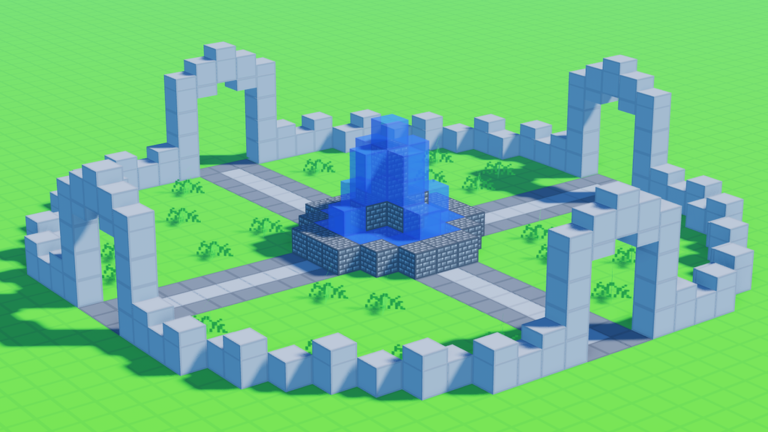
- Fountain ring — circular trench of contrasting blocks (or glass if you own Colored Glass Pack).
- Billboard wall — flat 12×6 canvas for palette tests from the blocks encyclopedia.
- Pet runway — looping path so Verity can roll/follow when equipped after the Verity update.
Palette recipes that never get old
- Warm village — sand/wood tones + one deep accent roof.
- Cool lab — grays + cyan/blue glass (Blue Dimension mood board on Blue Dimension).
- Rainbow parade — only if you own Rainbow Block Pack; restrict rainbow to trim or you get visual noise. Rank packs on the block pack tier list.
- Night market — dark solids + sparse glow accents; screenshot with low ambient.
Read tips and tricks for inventory habits that keep recipes consistent across sessions.
Mega ideas (Personal World weekends)
- Harbor district — docks, crates, lighthouse, three shops.
- Sky terrace — floating pad with stairs from ground (fly helps: Fly Ability [OP], Press F / mobile fly; details on controls).
- Museum wing — rooms labeled by material era (free weekly vs paid packs).
- Roleplay town square — fountain, stage, seating for online co-op stories.
- Dimension gate plaza — themed approach if you own The Blue Dimension (29 Robux).
Use Bombastic Pickaxe (99) when terraforming large mistakes; 2x Sprint Speed (49) when jogging a campus layout. Value notes: Game Pass tier list.
Idea → execution checklist
- Footprint marked with a one-block outline
- Height target decided (one / two / tower)
- Door and window grid sketched in your head
- Accent rule chosen (roof only / corners only / trim belt)
- Mid-build screenshot for before/after
- Personal World save before you quit
Mirror this with the build checklist when you want a stricter timer.
Inspiration without spoilers or scams
Community videos and screenshots are fuel—not homework. Never download “build paste” executors from random chats (scripts hub explains the risk). Official experience entry points stay on official links. Codes will not invent architecture for you; the Codes Hub still shows no reliable active codes as of August 2026.
Remix challenge (seven days)
Day 1 cottage → Day 2 shopfront → Day 3 bridge → Day 4 tower → Day 5 plaza → Day 6 palette island → Day 7 combine two into a mini campus. Archive each day in a Personal World folder of plots. By the end you will care less about “perfect YouTube builds” and more about your own silhouette language.
Ideas are worthless until they become blocks. Pick a 9×9 cottage, place the pad before you open another tab, and let the pickaxe edit the story. When the roof finally clicks, save it—tomorrow’s skyline starts with tonight’s finished doorframe in Voxel Block Builder.
Frequently Asked Questions
Quick answers about Voxel Block Builder on Roblox.
What should I build first in Voxel Block Builder?
A 9×9 cottage or 5×8 shopfront. Small footprints teach roofs and windows without exhausting a whole evening.
Should I build ideas on public servers or Personal Worlds?
Sketch snacks publicly if you want friends around; recreate keepers in Personal Worlds so they persist.
Do I need Rainbow Block Pack for creative builds?
No. Strong silhouettes work with free blocks. Rainbow packs help after your shapes already read clearly.
Where can I see a house idea example?
The embedded community video on this page shows a Voxel Block Builder house idea—remix the silhouette rather than copying every block.
How do weekly blocks fit into building ideas?
Add at most one new weekly material per project so your gallery shows evolution. See the Weekly Blocks update page for the habit loop.