Blocks in Voxel Block Builder
Select, place, mine, repeat—your whole sandbox runs on blocks.
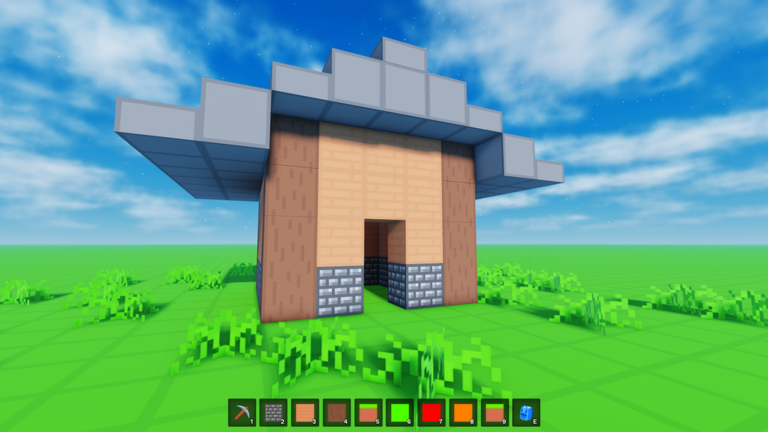
Blocks are the heartbeat of Voxel Block Builder. Every landmark, sofa, bridge, and meme statue starts the same way: open Inventory, select a block, click or tap to place, then mine with a pickaxe when the shape needs surgery. This page is the item-level deep dive under the Items Hub. For technique drills, keep How to Build nearby; for day-one orientation, use Getting Started.
The placement loop (master this first)
- Open Inventory and browse what you own.
- Select the block that matches your next surface.
- Click or tap the world to place.
- Step around the form—camera honesty beats hopeful angles.
- Equip the pickaxe and mine mistakes immediately.
- Reselect and place the correction before you “fix it later.”
Builders who batch fifty mistakes before mining create rubble piles and decision fatigue. Mine early. The Controls page helps if input mapping feels unclear on keyboard versus mobile.
Free blocks and the weekly cadence
Goober Labs adds weekly new blocks, so your free Inventory is a living catalog. That cadence is a major reason patient players can postpone Rainbow Block Pack (199) or Colored Glass Pack (89). Track themes and habits on Weekly Blocks and skim the Updates Hub after each drop.
Weekly routine that works
- Log in after the drop window you follow.
- Place each new block in a small “swatch wall” inside a Personal World.
- Label mental categories: structure, accent, flooring, roofing, detail.
- Only then rebuild a real facade with the newcomers.
Swatch walls prevent you from baking an untested neon cube into a carefully lit museum hall.
Paid packs as block multipliers
Rainbow Block Pack — 199 Robux
Broad hue coverage for gradients, festivals, and loud landmarks. Ranked in depth on the Block Pack Tier List. Buy when your next projects are color-primary, not when you are bored for ten minutes on a public server.
Colored Glass Pack — 89 Robux
Transparency and light play. Excellent for atriums, shops, and sci-fi labs. Combine with opaque free blocks so glass remains an accent unless the concept is crystal-first.
Related non-block passes that change block work
- Bombastic Pickaxe (99) — 2x mining distance for faster revisions.
- Fly Ability [OP] (299) — F / mobile flight for vertical placement.
- 2x Sprint Speed (49) — traverse large pads between material chests.
- The Blue Dimension (29) — exclusive blue area that reframes which blocks you favor.
Full pass context: Game Passes and Game Pass Tier List. Space details: Blue Dimension.
Materials thinking (even in a voxel toy)
Great voxel scenes pretend materials have jobs:
- Structure — load-bearing looking solids.
- Skin — the color people notice first.
- Trim — edges, frames, stairs lips.
- Glow / glass — focal highlights.
- Ground — pathways that guide friends in co-op.
When every block tries to be the star, the build screams. Limit your active palette per project. The Build Checklist is a good preflight for palette caps.
Personal Worlds versus public server plots
Personal Worlds save the builds that justify hours of block placement. Public servers offer online co-op (max 18 players)—wonderful for jams, risky as sole storage. If a friend drops a perfect arch in a busy server, recreate or continue it inside a Personal World before the session ends. See Personal Worlds.
Co-op block etiquette
Agree on rules before eighteen people open Inventory:
- Shared palette list (free-only, glass accents, or full rainbow).
- Zones of ownership (north wing vs plaza).
- Mining permissions (ask before deleting someone’s wall).
- Screenshot time with Verity equipped for the group mascot shot.
Link the experience via Official Links. Check Codes if free rewards can pad collaborative supplies.
Editing with the pickaxe like a pro
Mining is sculpting. Use it to:
- Cut doorways after walls exist.
- Hollow interiors without rebuilding shells.
- Create battlement gaps and window slits.
- Delete test pillars you no longer need.
If you own Bombastic Pickaxe, practice distance so you do not over-delete. If you do not, get comfortable with standard reach before spending—many players improve more from patience than from the pass.
Pattern library ideas (free-first)
Try these with whatever weekly blocks you currently own:
- Checker floors with two neutrals.
- Striped awnings for market streets.
- Ringed towers that change color each story.
- Sunken plazas framed by taller perimeter walls.
- Micro furniture: chairs as two-block stacks with a slab-like overhang if your set allows similar shapes.
Document winners in a Personal World “museum lane” so future you can copy modules instead of reinventing.
Pets and blocks in screenshots
Verity Pets do not alter block stats, but an equipped Verity that rolls/follows adds motion to otherwise static voxel shots. After a big facade finish, equip Verity, back the camera up, and capture scale. Update notes: Verity update.
Avoid these block mistakes
- Building only at eye level—use flight (paid or careful jumping paths) to read silhouettes.
- Ignoring ground language so visitors cannot find the entrance.
- Mixing every weekly drop into one house the day they arrive.
- Leaving masterpieces on public plots without Personal World backups.
- Buying both cosmetic packs before finishing a single free build.
Learning path with other wiki pages
New to Roblox controls in this experience? Controls.
Spending decisions? Tier List Hub.
Pass details? Game Passes.
Live changes? Updates.
Optional tooling chatter? Scripts—stay fair and keep worlds safe.
Blocks reward obsession and restraint at the same time. Obsess over clean placement and honest mining; restrain your palette so each new weekly piece has room to matter. When your Inventory feels noisy, return to a three-block challenge inside a Personal World—limitation is still the fastest teacher in Voxel Block Builder.
Finish this read by placing twenty deliberate blocks and mining five of them on purpose. If that tiny drill feels satisfying, you understand the item loop better than any store banner can teach.
Frequently Asked Questions
Quick answers about Voxel Block Builder on Roblox.
How do I place blocks?
Open Inventory, select a block, then click or tap to place. Use the pickaxe to mine and revise anything that looks wrong.
Are new blocks added often?
Yes. Voxel Block Builder receives weekly new blocks, so free Inventory options keep growing over time.
Which pack should I buy for more blocks?
Rainbow Block Pack (199) for broad color, Colored Glass Pack (89) for transparent and lit looks. Compare them on the Block Pack Tier List.
Does Bombastic Pickaxe add new blocks?
No. It doubles mining distance so you edit existing builds faster. It is an editing tool, not a palette pack.
Should I build on public servers or Personal Worlds?
Use public servers for online co-op (max 18). Save serious projects in Personal Worlds so your block work persists.