Voxel Block Builder Tips & Tricks for Faster Progress
Small habits that protect saves, Robux, and your weekly block pipeline.
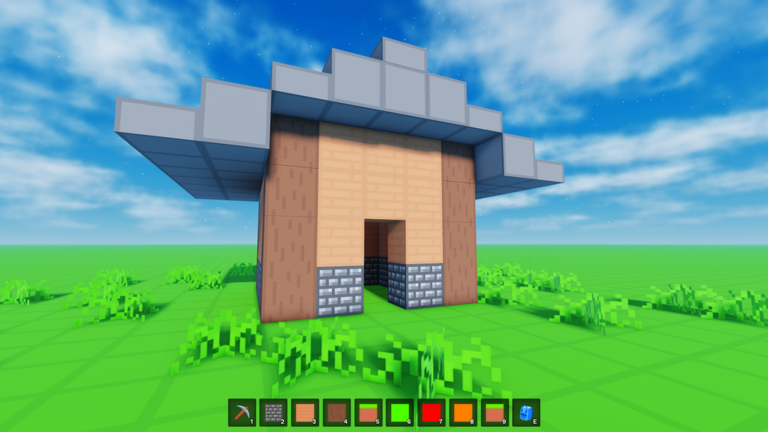
These Voxel Block Builder tips and tricks compress hard-won habits from builders who already live in Goober Labs’ Roblox sandbox. Nothing here replaces the core loop—Inventory → select → place → pickaxe—but each tip removes friction so you finish more roofs and lose fewer worlds. Cross-link depth lives in how to build, Personal Worlds, and building ideas.
Tip 1 — Like and favorite for weekly blocks
The experience asks players to like and favorite for new block updates every week. Make it a login ritual before you place anything. Track drops on weekly blocks and catalog materials under blocks. Missing a week is fine; missing the favorite toggle for months quietly shrinks your free palette.
Tip 2 — End every serious session on a save
If the build matters, it belongs in a Personal World. Public servers (max 18) are for jam energy and multiplayer roleplay. Run the world save checklist until it is muscle memory. The most expensive tip is free: save before you “quickly check another game.”
Tip 3 — Three-material rule
Limit early drafts to three materials. Add a fourth only after openings exist. Rainbow temptation from Rainbow Block Pack or glass from Colored Glass Pack feels productive and often wrecks readability—see block pack tier list and block packs.
Tip 4 — Place loud, mine soft
Draft silhouettes quickly, then equip the pickaxe as an editor. Bombastic Pickaxe (99 Robux, 2× mining distance) accelerates skyscraper revisions; houses rarely need it on day one. Technique first: how to build.
Tip 5 — Buy movement for the job, not the thumbnail
- Fly Ability [OP] (299) when roofs and floating pads dominate your week (Press F / mobile fly).
- 2x Sprint Speed (49) when campuses and tours dominate.
- The Blue Dimension (29) when you want a themed space, not a random impulse.
Compare on Game Passes and Game Pass tier list. Never trust a “free fly code”; the Codes Hub still shows no reliable active codes in August 2026.
Tip 6 — Screenshot mid-build
Capture elevations before big mining passes. When a Personal World experiment fails, the screenshot is your undo outside the pickaxe. Great for sharing ideas without dumping whole worlds.
Tip 7 — Equip Verity on purpose
After the Verity update, unlock and equip Verity so the pet rolls and follows. Unequip during precision micro-edits if the companion distracts you; re-equip for tours. Details: Verity Pets, pets.
Tip 8 — Name your goals in one sentence
“Finish north wall” beats “build something cool.” The build checklist exists to force that clarity. Combine with a timer (25–45 minutes) from Getting Started.
Tip 9 — Learn both PC and mobile inputs
Friends will join from phones. Know the controls matrix so you can callouts (“tap place, then pickaxe”) without assuming everyone has F to fly.
Tip 10 — Ignore auto-build snake oil
If a chat link promises instant megabases, close it. Read working scripts overview and script safety for why executors risk bans. Official entry points: official links.
Mistakes that still catch veterans
- Building the masterpiece only on a public pad
- Spending 299 Robux on Fly before learning scaffolds
- Glass-boxing an entire house on day one
- Hoarding weekly blocks without ever placing them
- Chasing codes instead of finishing doors (finding new codes is for alerts, not identity)
A weekly rhythm that works
Monday — favorite check + weekly swatch wall.
Wednesday — social jam / RP street.
Friday — Personal World polish + screenshots.
Weekend — optional pass experiment or Blue Dimension visit (Blue Dimension).
Patch awareness: skim patch notes and the Updates Hub after big titles like Verity so your tips stay current.
Tiny habits beat heroic all-nighters. Favorite the game, save the world, limit the palette, and let the pickaxe stay honest—those four tricks alone will outpace most “secret OP” videos in Voxel Block Builder.
Frequently Asked Questions
Quick answers about Voxel Block Builder on Roblox.
What is the single best tip for new players?
Like and favorite the game for weekly blocks, then save anything you care about in a Personal World before you log off.
Which Game Pass should I buy first?
Match the pass to your bottleneck: Fly for roofs, Sprint for travel, Bombastic Pickaxe for big revisions, Blue Dimension for a themed space. Read the tier list before spending.
Do tips require using scripts?
No. These tips assume legitimate play only. Skip third-party executors that claim auto-build shortcuts.
How often should I check for codes?
After major updates or milestones. Most weeks there are no active codes—confirm on the Codes Hub instead of testing random strings.
How do I keep builds looking clean?
Use the three-material rule, mine openings on purpose, and screenshot before risky edits.